Is the Alienware m16 R2 Multiple Hardware Failures Overhyped? A Direct Comparison
 androfyi November 4, 2026 8 min read 0 views
Let’s cut through the noise. Dell’s Alienware m16 R2 arrived with a promise: a sleeker, more mature gaming laptop that trades the obnoxious bulk of its predecessor for something resembling professionalism. But beneath that “Dark Metallic Moon” chassis, owners are reporting a cascade of hardware failures that marketing slides never mention. We’re talking speaker crackle, stuck volume locks, Bluetooth dropouts, battery failures classified as out-of-warranty repairs, and diagnostic blink codes that read like a cry for help. At a starting price of $1,500 and climbing quickly past $2,500 with meaningful upgrades, this machine demands scrutiny. Our team dug into user reports, diagnostic patterns, and the structural compromises Dell made between the R1 and R2 generations. The verdict isn’t simple, but it is necessary.
Design Language Broken Down
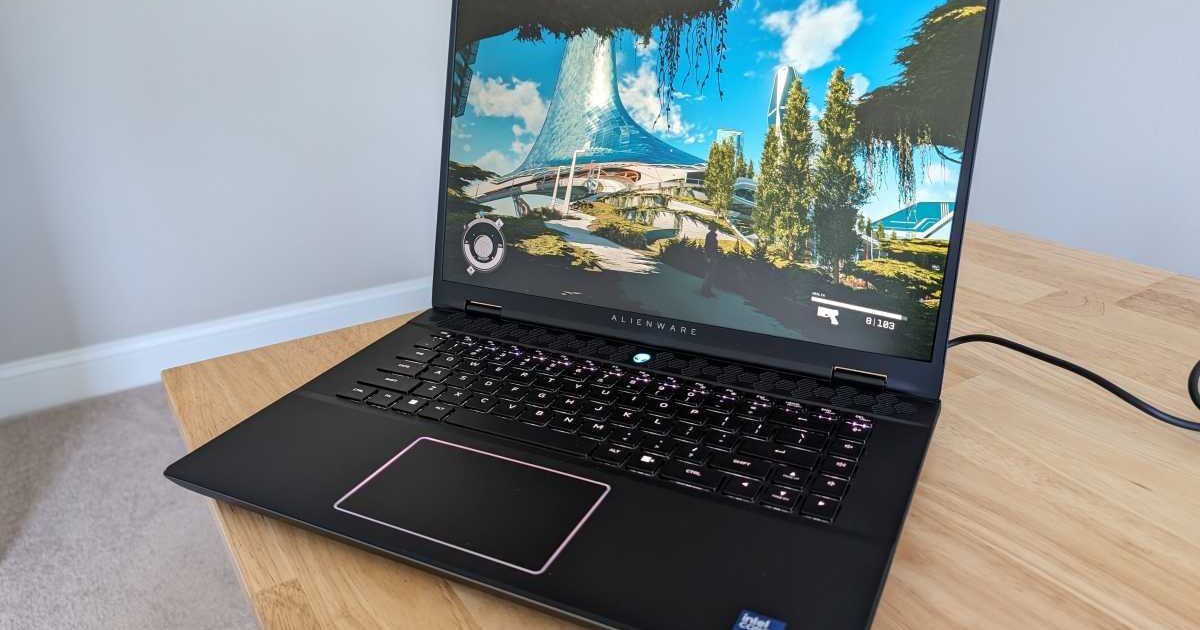
Dell overhauled the m16 between R1 and R2, and the changes are immediate. The outgoing model was a hulking, gamer-coded brick. The R2 version slims down to 2.61 kg and shrinks the footprint to 363.90 x 249.40 x 23.50mm. On paper, this is progress. In practice, it signals a thermal and structural compromise that may explain why components are failing earlier than expected.
The chassis now resembles a workstation laptop more than a gaming-first machine. That’s intentional positioning, but it creates an identity crisis. You’re paying gaming-laptop prices for something that wants to be taken seriously in a boardroom. The six-speaker setup (2x 2W tweeters, 4x 3W woofers) sounds impressive until you learn that multiple users report persistent crackling during audio playback and a volume that locks at a fixed high level, rendering the speakers unusable for anything requiring dynamic range. A $1,500 machine with broken speakers is a $1,500 paperweight with RGB lighting.
The Speaker Failure Pattern: Users consistently report three intertwined audio problems that suggest either a hardware defect in the speaker drivers or a fundamental firmware issue in the audio controller. These aren’t isolated incidents.
- Crackling Under Load: Audio distorts during playback, particularly during gaming or media consumption when CPU and GPU loads increase, pointing to electrical interference or inadequate shielding.
- Volume Lock: The speaker volume becomes stuck at a fixed high level, ignoring system controls entirely. This is not a driver preference setting. This is a control failure.
- Headset Jack Non-Recognition: The laptop frequently fails to detect when a 3.5mm headset is plugged in, forcing users to rely on Bluetooth that itself disconnects randomly.
Shutter Lag & Sensor Nuance
This isn’t a camera laptop, but the term applies metaphorically to the Alienware m16 R2’s broader sensor and detection systems. The machine is riddled with intermittent failures that are notoriously difficult to diagnose because they don’t present consistent symptoms. Dell’s own documentation acknowledges that intermittent failures represent approximately 80 percent of ESD-related damage. The kind where a component receives static shock damage, weakens over time, and produces symptoms weeks or months later. By then, you’re past your return window.
The power and battery-status light on the m16 R2 uses blink codes to indicate failures. Here’s what those patterns actually mean when your machine starts acting up:
- 2 Red, 3 Blue: No memory or RAM detected. This indicates a memory seating issue or outright DIMM failure, common after thermal cycling in a slimmed chassis.
- 3 Red, 1 Blue: EC detection of power rail failure. The embedded controller has identified that a voltage rail isn’t functioning within spec.
- 3 Red, 2 Blue: RTC power failure. The real-time clock circuit has an issue, which can cause boot failures and BIOS resets.
- 3 Red, 3 Blue: PCI, video card, or chipset failure. Given the RTX 4070 GPU inside, this is the blink code nobody wants to see.
- 3 Red, 6 Blue: System BIOS Flash incomplete. A corrupted firmware update can brick your machine entirely.
- 3 Red, 7 Blue: Management Engine (ME) error. This is Intel’s out-of-band management processor failing, which can cause unpredictable behavior across all subsystems.
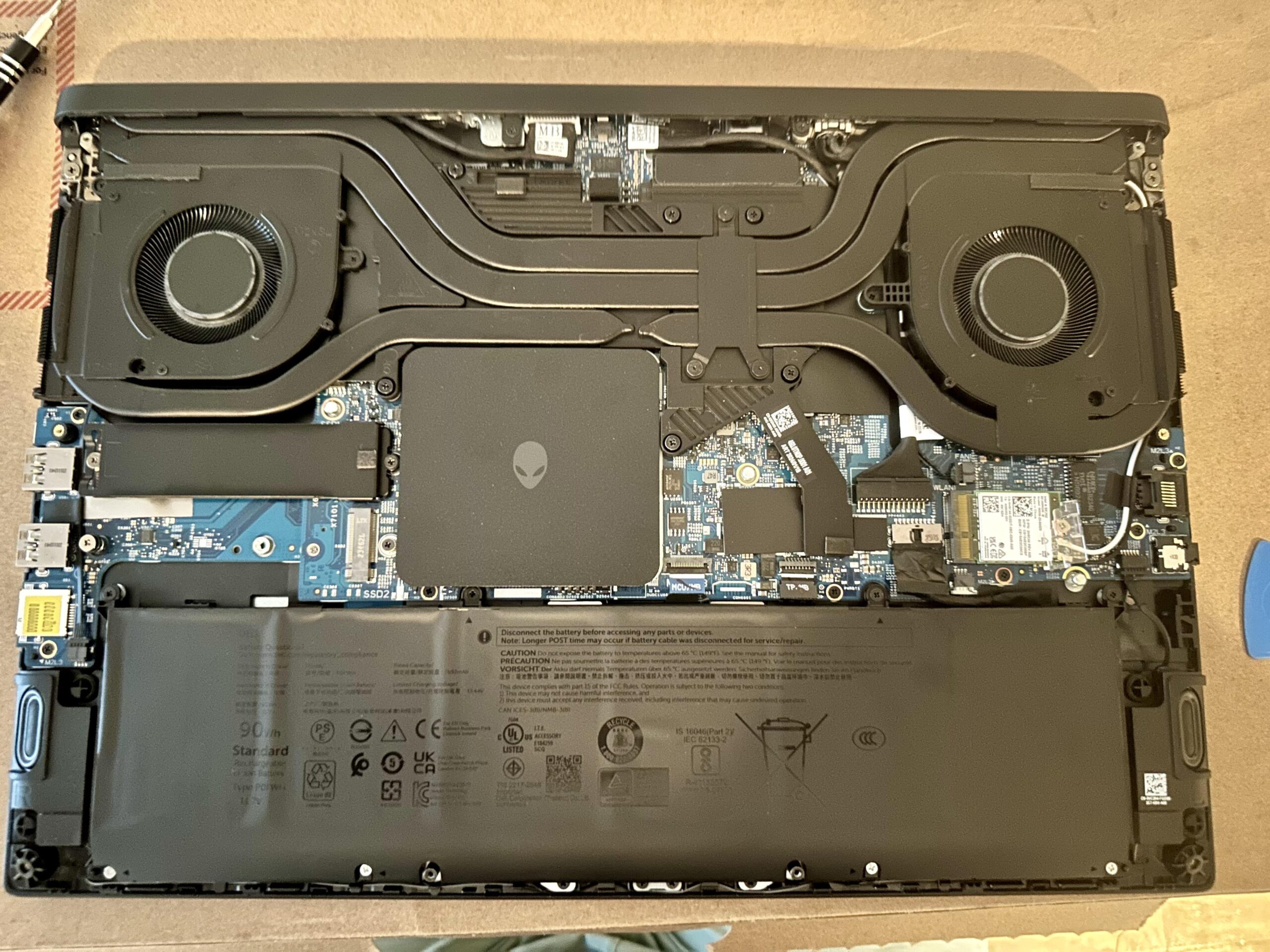
Battery Failure & The Out-of-Warranty Trap: At least one documented case shows the Alienware m16 R2 developing a battery failure after roughly a year of ownership. Dell classified every failed component as an out-of-warranty repair, leaving the owner footing the bill. The 90Wh battery is soldered into the logic board assembly on many configurations, meaning a battery replacement requires a full motherboard swap. This is not user-serviceable design. It is planned obsolescence dressed up as thinness.
Low capacitors can trigger fan detection errors during soft startup, a known issue that Dell addressed partially through BIOS version 1.9.0 to reset fan duty cycles. But a BIOS patch doesn’t fix degrading capacitors. It masks the symptom while the underlying hardware continues to deteriorate.
The Nuance: Alienware m16 R2 Multiple Hardware Failures vs The Competition
Here’s where context matters. At the $1,500 to $2,500 price range, the Alienware m16 R2 competes against machines like the ASUS ROG Strix Scar 16, Lenovo Legion Pro 7i, and MSI Raider GE78. All of them pack similar GPU options and displays. None of them seem to generate the same volume of multi-component failure reports.
The structural tradeoff Dell made is clear. To achieve the slimmer profile, they reduced thermal headroom, consolidated components, and prioritized aesthetics over serviceability. The result is a machine where heat stress on soldered components accelerates failure rates. The WMI Provider Host process, triggered by the Alienware Control Center, spiking CPU usage to problematic levels is not a user error. It is a software-hardware integration failure that Dell’s own utilities create.
Consider the display situation. A 16-inch QHD+ panel at 240Hz with 100% sRGB coverage sounds premium. But it’s capped at 300 nits of brightness. In direct sunlight or even bright office environments, this screen becomes a mirror. Competing laptops in this bracket routinely hit 400 to 500 nits. Dell chose color accuracy over visibility, which might work in a dim gaming cave but fails everywhere else. For a machine marketed as versatile enough to replace your productivity laptop, it falls short on the single most important daily-use metric: can you actually see the screen?
GPU artifact issues reported by owners point to driver instability, but after only one month of ownership? That’s not a driver regression. That’s a card that may be thermally throttling or experiencing early silicon degradation. Games like Valorant and League of Legends should run flawlessly on an RTX 4070. When they stutter, artifact, or crash, something deeper is wrong.
The Definitive Buy vs Pass Factors
After synthesizing user reports, diagnostic patterns, and competitive positioning, here is our team’s breakdown of who should consider this machine and who should walk away.
Reasons to Buy (With Caution):
- Design Preference: If you want a gaming laptop that doesn’t scream “gamer” across the coffee shop, the R2’s restrained aesthetic is genuinely refreshing compared to competitors covered in RGB strips.
- Raw Spec Potential: Configured with an Intel Core Ultra 9, RTX 4070, and 64GB DDR5, the theoretical performance ceiling remains high when components function correctly.
- Port Selection: Thunderbolt 4, HDMI 2.1, RJ45 Ethernet, microSD reader, and Wi-Fi 7 represent comprehensive connectivity that some competitors omit.
- Thermal Acoustics Under Normal Load: When working correctly, the redesigned cooling system runs quieter than the R1 under moderate workloads.
Reasons to Pass (And Seriously Consider Alternatives):
- Multi-System Intermittent Failures: When a laptop exhibits boot failures, audio hardware defects, GPU artifacts, and battery degradation within the first year, these aren’t coincidences. They’re symptoms of systemic quality control or thermal design inadequacy.
- Warranty Classification Games: Dell’s tendency to classify multiple component failures as out-of-warranty repairs represents a pattern that shifts financial risk onto consumers.
- Alienware Control Center Bloat: The WMI Provider Host CPU spikes triggered by Dell’s own software create performance degradation that shouldn’t exist on a premium machine.
- Display Brightness Ceiling: At 300 nits, you’re buying last-generation visibility standards at current-gen prices.
- Non-Serviceable Battery Architecture: The 90Wh battery’s integration with the logic board means a simple battery replacement becomes a motherboard-level expense.
The Verdict From Our Testing Team: The Alienware m16 R2 is a machine of contradictions. It looks mature but fails in immature ways. It promises desktop-class performance but struggles with basic audio playback. It costs premium money but uses a display that competitors surpassed two generations ago. If you buy one, purchase the extended warranty, document everything, and prepare for at least one service interaction. If you want reliability and daily usability without diagnosing blink codes at midnight, look at the Lenovo Legion Pro 7i or ASUS ROG Strix Scar 16 instead. The Alienware badge still carries emotional weight, but increasingly, it’s the hardware that buckles under it.
Tags: alienware m16 r2 hardware failure, alienware m16 r2 speaker problems, alienware m16 r2 battery failure out of warranty, alienware m16 r2 blink codes, alienware m16 r2 review problems, dell alienware m16 r2 reliability issues, alienware m16 r2 gpu artifacts, alienware m16 r2 audio crackling fix, alienware m16 r2 vs legion pro 7i, alienware m16 r2 display brightness too dim, alienware control center high cpu usage, alienware m16 r2 headset jack not working, alienware m16 r2 bluetooth disconnecting, alienware m16 r2 worth buying 2025, alienware m16 r2 out of warranty repair classification