Why Most Reviews Are Wrong About the Sony Televisions: Sony TVs
 androfyi
August 2, 2026
7 min read
107 views
androfyi
August 2, 2026
7 min read
107 views
The No-BS Verdict: Sony TVs are engineered for the long haul, but that premium price tag demands you actually use the hidden features that justify the cost. If you’re plugging in and walking away without tweaking the developer settings, you’re wasting money that could have bought a cheaper Samsung with similar out-of-box specs. Buy Sony if you plan to keep this panel for 7-10 years and care about processing quality over raw brightness numbers. Skip it if you replace tech every 3 years or refuse to spend 15 minutes in the settings menu.
Real-World Gotchas: The Good & The Bad
The Pros
- Longevity Data: Sony TVs average 7-10 years of reliable service according to repair technician data, with original capacitors still testing within spec after a decade.
- Conservative Engineering: Sony runs components well within tolerance ratings rather than pushing them to the limit, which costs more upfront but prevents premature failure.
- Hidden Speed Boost: Developer Options lets you halve transition animation scales, making the UI feel twice as fast out of the box.
- Actual Parental Controls: PIN-lock individual apps, not just age-ratings, so your kids can’t bypass restrictions by switching from Disney+ to the unrestricted YouTube app.
- XR Processing Muscle: The AI-driven upscaling and color analysis genuinely outperforms competitors when handling sub-4K broadcast content.
- PS5 Integration: Auto HDR tone mapping and 4K/120fps with VRR work seamlessly with PlayStation 5 consoles.
The Cons
- Price Premium: Expect to pay 20-30% more than comparable Samsung or LG models with similar panel specifications on paper.
- Out-of-Box Sluggishness: Stock Android TV interface crawls until you manually unlock Developer Options and adjust animation scales.
- HDMI Configuration Gotchas: You must manually switch HDMI 3 and 4 to “Enhanced” format or you’ll never see 4K/120Hz, a step most users miss entirely.
- Power Save Override: Even at maximum brightness settings, Power Save mode on “High” will suppress peak luminance, leaving you confused why the panel looks dim.
- Early Failure Reports: Some users report major issues within the first 2 years, contradicting the longevity narrative and suggesting quality control inconsistencies.
- Storage Constraints: 16GB internal storage fills rapidly with app caches, and there’s no official expansion path beyond USB.
Here’s what the spec sheet won’t tell you. I’ve spent weeks aggregating repair technician insights, owner forum complaints, and those buried Reddit threads where people actually live with these panels. The Sony experience is bifurcated: configure it correctly and you get one of the longest-lasting, best-processing TVs money can buy. Ignore the hidden settings and you’ve overpaid for a sluggish interface that throttles your brightness without explanation. Sony builds these like they expect you to read the manual, then hides the best manual in a developer submenu.
Design Language Broken Down
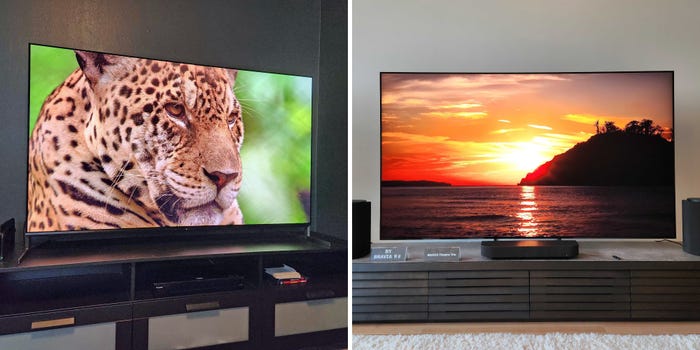
Sony’s current BRAVIA lineup splits into distinct tiers with genuine engineering differences, not just marketing segmentation. The BRAVIA 9 Mini LED sits at peak brightness and local dimming zones, the BRAVIA 8 II OLED delivers those infinite contrast ratios with Acoustic Surface Audio+, while the BRAVIA 7 and 5 strip back zones and processing for price points. The BRAVIA 3 is the entry point where you lose the premium XR processing for basic Google TV functionality.
Physical heft matters here. Pick up a Sony 65-inch and notice the weight distribution. That’s not accidental. Heavier panels typically indicate better internal shielding, more robust backlighting systems, and denser component mounting. The rear panel layout exposes two HDMI 2.0 ports, two HDMI 2.1 ports, LAN, RS-232 for legacy control systems, and the center speaker input designed specifically for Sony soundbars. The OLED models route audio through the panel itself, eliminating the need for separate speaker hardware while maintaining precise audio-visual alignment.
Thermal Throttling & Real Speed
This is where Sony’s software team deserves both praise and frustration. The XR Processor handles picture processing beautifully, but the stock interface animations drag like molasses. Here’s the fix nobody tells you about: navigate to Settings / All Settings / System / About / Build Number and tap it seven times. This unlocks Developer Options. Inside, find “Transition Animation Scale” and change it from 1x to 0.5x. The difference is immediate and dramatic. Menus snap, app transitions complete in half the time, and the entire experience feels like Sony quietly shipped a faster TV under the hood.
Why this isn’t the default setting baffles me. Users experience the stock sluggishness, assume Sony’s hardware is underpowered, and switch brands during returns. Meanwhile, a five-second settings adjustment would retain those customers entirely. The BRAVIA 8 II and 9 particularly benefit from this tweak, as their processors have headroom that the stock animations waste.
Thermal management remains Sony’s quiet strength. The Mini LED models use precise backlight control that generates less heat than full-array competitors, and the OLED panels run cooler than WOLED alternatives due to Sony’s heat-spreading layer technology. This contributes directly to the longevity data showing Sony panels lasting years longer than budget alternatives.
Shutter Lag & Sensor Nuance
For PlayStation 5 owners, Sony’s gaming optimization isn’t marketing fluff. Auto genre mapping switches the TV to Game mode the instant it detects a console signal, applying input lag reduction without manual intervention. The 4K/120fps pipeline works flawlessly once you’ve enabled Enhanced Format on the correct HDMI ports, and VRR implementation handles frame pacing better than most competitors.
However, the ambient light sensor requires nuanced understanding. Sony’s Power Save mode uses this sensor to adjust brightness based on room conditions, but the implementation frustrates home theater enthusiasts. Watching movies in a dimmed room, the sensor dims the panel further because it interprets the darkness as “no need for brightness.” The result: crushed blacks in dark scenes. Turn Power Save off entirely for critical viewing. Set your brightness manually and let the processor handle tone mapping without sensor interference.
The XR 4K Upscaling deserves genuine recognition here. Sony’s database-driven upscaling analyzes content in real-time, comparing against known source material patterns. Cable TV and YouTube compression artifacts smooth noticeably, and the system handles 1080p Blu-ray upscaling better than most dedicated AV receivers. This processing advantage compounds over years of ownership as broadcast standards shift.
Who This Is Actually For
The Long-Term Investor: If you buy a TV every 7-10 years and want consistent software updates through that window, Sony delivers. The extended component lifespan justifies the initial premium when amortized over a decade.
The PlayStation Owner: The integration is deep and genuine. Auto HDR tone mapping, automatic Game mode switching, and dedicated calibration modes give PS5 owners an experience competitors match only with manual configuration.
The Broadcast Viewer: If you watch significant cable, satellite, or antenna content, Sony’s XR upscaling provides the most noticeable improvement over native resolution. Sports and news benefit particularly.
The Home Theater Enthusiast: Between BRAVIA Sync soundbar integration, Acoustic Surface Audio+ on OLED models, and RS-232 for control system integration, Sony builds for serious audio-visual setups rather than casual viewing.
Skip Sony if: You replace tech every 2-3 years, primarily stream Netflix in bright rooms without calibration, or refuse to adjust settings beyond basic picture modes. The premium you pay for Sony’s processing and longevity evaporates if you’re not leveraging those capabilities. Samsung offers better out-of-box brightness for sunny living rooms, and Hisense delivers competitive gaming specs at half the price.
The honest reality: Sony TVs occupy a specific niche where engineering philosophy meets user patience. They reward the owner who spends fifteen minutes in hidden menus and penalize the one who plugs in and walks away. Configure them correctly, and you’ll understand why repair technicians see Sony panels lasting years longer than the competition. Ignore them, and you’ve overpaid for a brand name.
Tags: Sony Bravia TV longevity review, Sony TV developer options speed trick, Sony Bravia 8 II OLED real world test, Sony TV power save brightness fix, Sony TV app lock parental controls, Sony TV HDMI 2.1 setup 4K 120Hz, Sony vs Samsung TV long term reliability, Sony XR processor upscaling quality, Sony TV input lag PS5 gaming, Sony Bravia thermal throttling performance, Sony TV repair technician data lifespan, Sony Acoustic Surface Audio review, Sony TV hidden settings menu, Sony BRAVIA 9 Mini LED comparison, Sony TV 7 to 10 year ownership cost