Fixed: What to know before flying a Mavic 4 pro? (The Fast Way)
 androfyi
April 26, 2026
3 min read
230 views
androfyi
April 26, 2026
3 min read
230 views
⚡ The 30-Second Fix
Before flying your Mavic 4 Pro, confirm you have the right licensing for its C2 classification due to its 1063g weight, and ensure you’re using the correct combo – Creator version includes a 512GB SSD and DJI RC Pro 2, while standard versions only have 64GB storage. Also, always check local flight regulations, update firmware, and practice in open areas with good visibility.
Flying the DJI Mavic 4 Pro is an incredible experience – until you realize it’s heavier, pricier, and more regulated than expected. Many pilots jump in without knowing key details about its weight class, storage limitations, or controller differences, leading to compliance issues, storage headaches, or missed shots. This guide cuts through the noise so you can fly confidently from day one.
The Checklist
- Weight & Regulation Class: At 1063 grams, the Mavic 4 Pro is a C2 drone in the EU, requiring additional licensing and operational restrictions compared to lighter models like the Mini 4 Pro.
- Storage Capacity: The standard Mavic 4 Pro has only 64GB internal storage – insufficient for 6K video or 100MP photos. The Creator Combo upgrades to a 512GB SSD, essential for professional workflows.
- ProRes & Encoding Limitations: Unlike the Ciné version of the Mavic 3 Pro, the Creator version of the Mavic 4 Pro does not support ProRes, though it does support ALL-I 4:2:2 encoding for high-quality post-production.
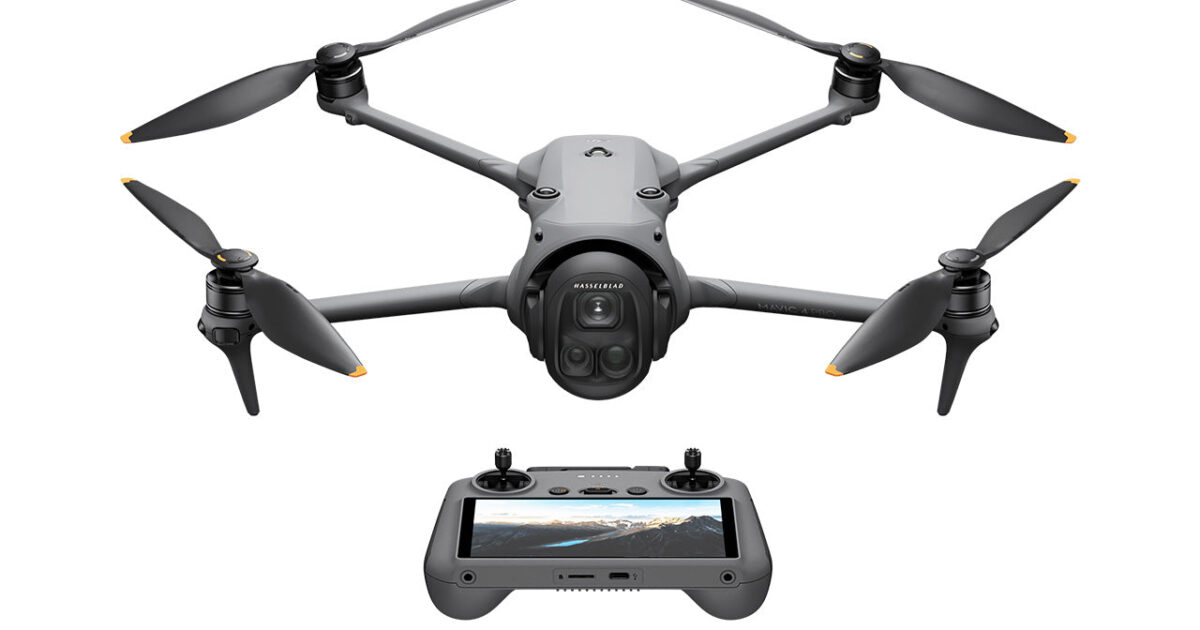
- Controller Options: The DJI RC Pro 2 (included in Creator Combo) offers a 7-inch Mini-LED screen, flight simulator, auto-deploying sticks, and 4-hour battery life – ideal for serious creators. The standard RC 2 lacks these pro features.
- Flight Time & Battery Management: Rated for up to 51 minutes, real-world use typically yields around 45–48 minutes. The Fly More and Creator Combos include multiple batteries and fast chargers – critical for extended shoots.
- Transmission & Range: OcuSync 4+ provides stable, long-range transmission (up to 30 km FCC / 15 km CE), with improved performance in signal-dense environments and better multi-drone coordination.
- Obstacle Avoidance: Features omnidirectional sensing with front-facing LiDAR that works in near darkness (0.1 lux) – great for low-light filming, but avoid flying toward glass, water, or thin obstacles.
- Portability: It’s bulkier and heavier than the Mavic 3 Pro – plan your carrying case accordingly. The included bag in combos helps, but it won’t fit in compact backpacks designed for smaller drones.
The First Step

Phase 2: The Settings
Once unboxed, activate your drone via the DJI Fly app, update all firmware, and calibrate sensors. Set your preferred camera mode (photo/video), enable obstacle avoidance, and configure transmission settings based on your region (FCC/CE). If using the RC Pro 2, explore the built-in flight simulator to rehearse maneuvers safely before heading outdoors.
Troubleshooting
- Storage Full Too Fast? You’re likely shooting 6K video or 100MP stills – switch to lower resolutions or invest in high-capacity microSD cards (up to 1TB supported).
- Transmission Drops in Cities? O4+ is better than previous systems, but urban interference still happens – fly in open sightlines and avoid congested RF zones.
- Drone Feels Sluggish in Wind? It handles up to 12 m/s winds well, but in Sport mode, obstacle avoidance turns off – use Normal mode for safer flight in gusty conditions.
- Can’t Fly Legally in Europe? Remember: C2 classification means you may need operator registration, training certificates, and geo-awareness checks before each flight.
- Vertical Video Not Working? On the RC Pro 2, rotating the screen automatically adjusts the gimbal for native vertical recording – ensure this feature is enabled in camera settings.
Tags: DJI Mavic 4 Pro, drone regulations, C2 drone, OcuSync 4+, Creator Combo, RC Pro 2, 512GB SSD, 6K video, obstacle avoidance, flight time, drone licensing, prosumer drone, Hasselblad camera, Infinity Gimbal, pre-flight checklist