Verdict in 10 Seconds: The Alienware m16 R2 delivers impressive performance and a refined design, but its battery life struggles when you push it hard – especially during gaming.
The Good & The Bad
- Premium Build & Sleek Design: Aluminum chassis with a minimalist aesthetic, lighter (5.75 lbs) and slimmer than previous models.
- Strong Gaming Performance: Intel Core Ultra 7 155H + RTX 4070 handles modern titles smoothly at QHD+ resolution.
- Excellent 240Hz QHD+ Display: 16-inch IPS panel with G-Sync and Advanced Optimus for tear-free, responsive gameplay.
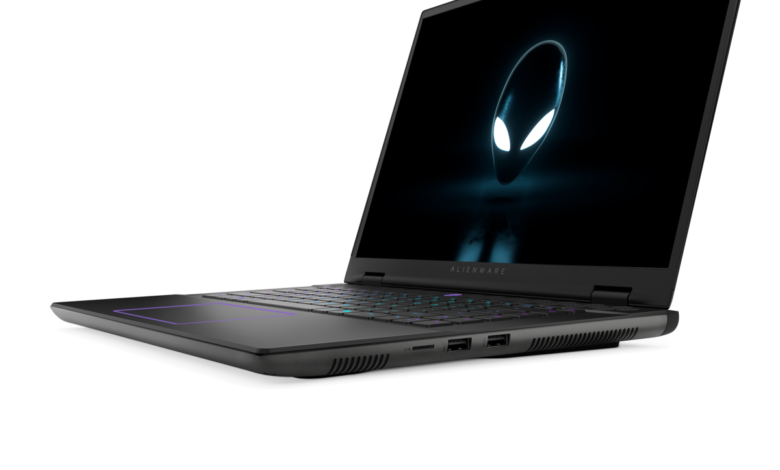
- Thoughtful Connectivity: Thunderbolt 4, HDMI 2.1, 2.5G Ethernet, microSD reader, and Wi-Fi 7 cover all bases.
- User-Friendly Upgrades: Larger trackpad, improved keyboard layout, wake-on-lid-open, and Windows Hello facial recognition.
- Battery Drains Fast Under Load: Despite a large 90Wh battery, gaming sessions last only 1.5–2 hours; even日常 use maxes out around 10 hours.
- No RTX 4080/4090 Option: Top GPU capped at RTX 4070 – disappointing for enthusiasts wanting max frame rates.
- Limited VRAM: Only 8GB GDDR6 on the RTX 4070 may bottleneck future-proofing in demanding games.
- Display Lacks HDR: Color accuracy and brightness are adequate but not exceptional for creative work or premium media.
- Price Creeps Up with Configs: Base model starts reasonably at $1,649, but fully loaded versions near $4,000 compete with desktops.
The Alienware m16 R2 marks a smart evolution from its predecessor – trimming bulk without sacrificing core gaming chops. Dell ditched the bulky rear thermal block, shaving size and weight while keeping the sleek, futuristic vibe that defines Alienware. What you get is a 16-inch powerhouse that feels more like a premium ultrabook than a traditional gaming brick – until you fire up a game and remember it’s still built for performance first.
In The Hand

Lifting the lid is effortless – one finger does the trick – and the laptop wakes instantly thanks to lid-open detection. The hinges feel rock-solid, allowing the screen to lay flat at 180 degrees, and the slim bezels (except a slightly thicker bottom edge) give it a modern, immersive look. The keyboard is comfortable for long typing or gaming sessions, with per-key RGB lighting via AlienFX, and the trackpad – finally – is usable, not tiny. Face unlock via the IR camera works flawlessly, though there’s no fingerprint reader or webcam shutter, which feels like an omission at this price.
Performance Test
Powered by Intel’s Core Ultra 7 155H and an RTX 4070, the m16 R2 handles everything from AAA titles to multitasking with ease. In Doom Eternal at medium settings, it consistently hit over 200 FPS – showcasing the value of that 240Hz display. Advanced Optimus seamlessly switches between integrated and discrete graphics, minimizing lag when launching games. However, the 8GB of VRAM on the GPU shows its limits in texture-heavy scenarios, and the absence of higher-tier GPU options means this isn’t the machine for 4K ultra-settings enthusiasts.
Photo & Video Quality
The 1080p IR webcam delivers clear video for calls and streaming, and the dual-array mics pick up voice well with minimal background noise. That said, the lack of a physical shutter might concern privacy-focused users. The display covers 100% DCI-P3 color space, making it decent for casual photo editing, but the matte IPS panel lacks the pop of OLED or HDR support – fine for gaming, less ideal for professional content creation.
Final Score
8 / 10
A refined, portable gaming rig with strong performance – just don’t unplug it for too long.
Tags: Alienware m16 R2, gaming laptop review, RTX 4070 laptop, Intel Core Ultra 7, 240Hz display, Dell gaming, portable gaming laptop, QHD+ gaming, battery life test, Windows Hello laptop, Thunderbolt 4, G-Sync laptop, midrange gaming, laptop performance, Alienware design